What Is Candy AI? How It Works and How to Use It Once You Pay
What is Candy AI? An adult AI companion app from EverAI Limited, a company in Malta. You chat with a ready-made character or one you build, and she replies with text, pictures, voice messages, calls and short videos. Once you pay, text chat is unlimited and 100 tokens a month cover the media, from $3.99 a month on the annual plan. Creating a character costs 10 tokens, and the chat carries a relationship over several evenings, held together by memory.
Frequently asked questions
What is Candy AI?
Candy AI is an 18+ AI companion app from EverAI Limited, a Maltese company, launched in 2023. You chat with ready-made characters or build your own, and the companion answers in text, sends pictures and voice messages, takes calls and appears in short videos. It runs in the browser and as a home-screen app.
How does Candy AI work?
You subscribe, confirm you are over 18, then pick a character or build one. Text chat is unlimited on every paid plan. Pictures, voice, calls and video are paid with tokens, 100 of them a month on Premium. A Chat settings panel sets the chat model, the length of her replies and how the relationship moves, and memory lets her bring back what you told her before.
Is Candy AI private?
Candy is run by EverAI Limited under a published privacy policy: it says personal data is not sold, keeps an account's data for up to three years after its last activity unless you ask for deletion sooner, and uses aggregated or depersonalized data to improve its models. Payments show as EverAI on a statement, so the name Candy does not appear there.
How do I remove my card from Candy AI?
In Settings, the Current Plan card has a Change payment method button that replaces the card on file. Unsubscribe, in the same place, stops the renewals, and access runs to the end of the term already paid.
How do you use Candy AI on a phone?
Open candy.ai in the browser and add it to the home screen: an iPhone does it from the Share button in Safari, and Android phones from the Chrome menu. Candy runs in the browser only, with no app in the App Store or on Google Play, and apps there with Candy in their name come from other publishers.
Is Candy AI good for roleplay?
For a slow, ongoing relationship, yes. On my paid account the chat was the strongest part of Candy: she stayed in character across several evenings and remembered what we had talked about, and the Thoughtful chat model is made for slower, narrated stories. Candy also has group chats with up to three characters and Live Action video scenes on a selection of characters.
In this review (9 sections)
Candy AI makes the most sense from inside a paid account. That is where the character you shaped starts to remember you, and where a small balance of tokens turns a conversation into pictures and a voice. My own Premium plan was active for over two weeks of May 2026, I went back to a paid account in October, and what follows takes the app in the order you meet it after checkout, with the cost of each step.
What is Candy AI?
EverAI Limited, based in Malta, has published Candy AI since 2023, for adults who want a companion more than a chatbot. She can be one of the characters already on the site or one you design yourself. Either way she writes back, sends pictures and voice notes, picks up when you call and acts out scenes on video.
It runs at candy.ai in any browser and installs as a home-screen app on a phone. The site sorts its characters into three categories, Girls, Anime and Guys, and the menu down the left side leads to everything else: Discover, Chat, Create Character, My AI, Generate Image and, new this autumn, Candy Studio.
How to use Candy AI, step by step
- Choose a Premium term on the subscription page: $9.99 for the first month, $26.97 for three months or $47.88 for a year.
- Confirm you are over 18.
- Open a character from the homepage, or build your own in Create Character for 10 tokens.
- Write to her as often as you like, since text messages are unlimited on every paid plan.
- Spend the monthly tokens on what you see and hear: pictures, voice messages, calls and video.
The sections below take each step in that order, with what it costs.
What happens right after you pay?
The account opens with the plan’s tokens on the counter at the top right, 100 a month on Premium, and nothing else to set up. The age check on my account was a plain declaration, which Candy’s underage policy describes as self-declared: you confirm you are over 18 and carry on.
From there you can start a chat with any character on the homepage within seconds. A built-in guide called Candy Assistant sits in the chat list too, ready to answer questions about the platform if a button is not where you expect it. Text messages never touch the token counter, whichever paid plan you are on.
If you are still deciding on a billing term, the plan page on Candy AI lists the three terms; the annual one costs $3.99 a month, charged $47.88 at once.
How do you build your own character?
Create Character now opens Character Studio, which takes two steps. Appearance comes first: ethnicity, age and body type, then her face, with six face generations free, so you can keep going until the face is the one you want.
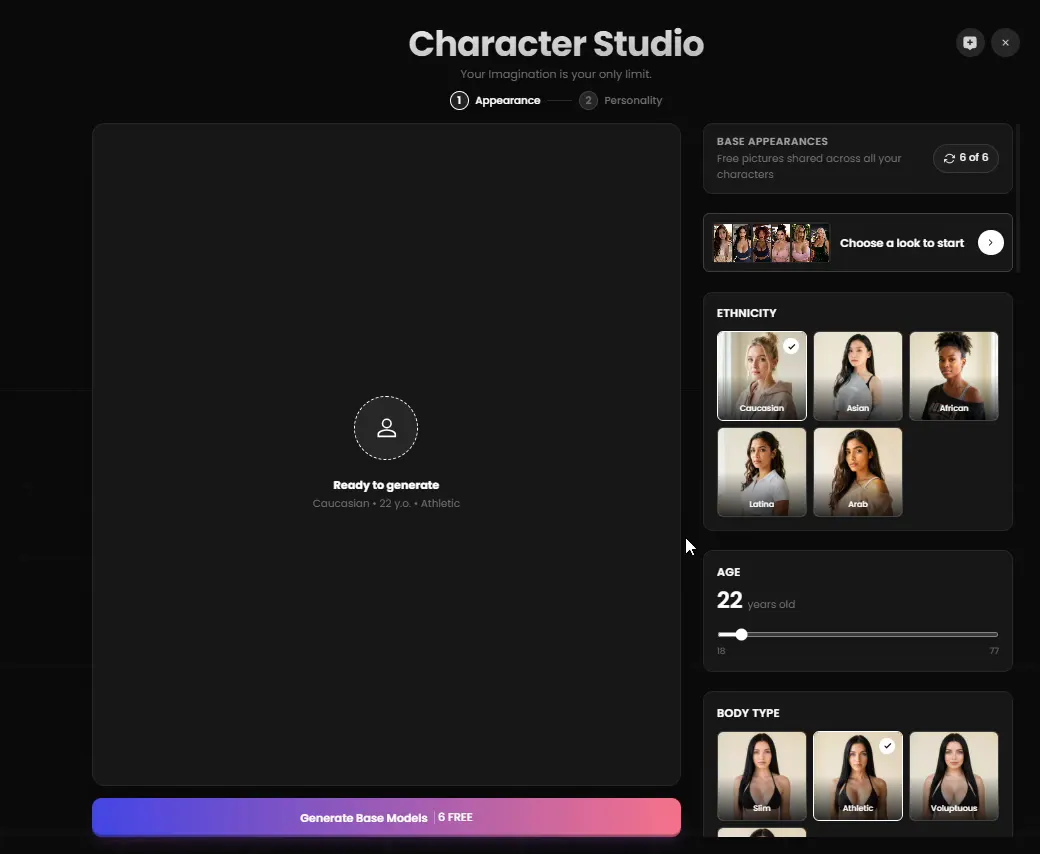
The first step of Character Studio: her look, with six faces to generate for free.
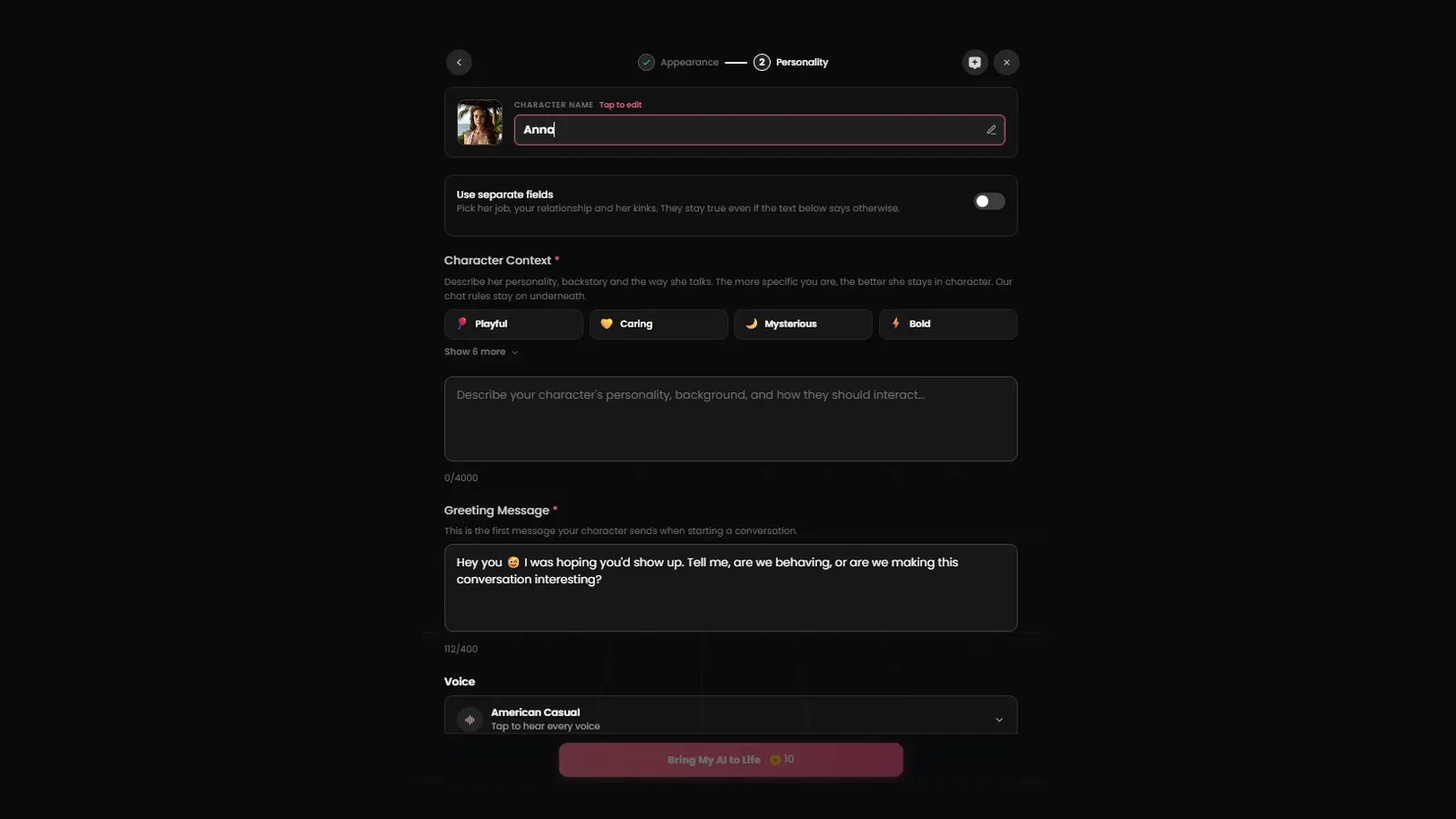
Personality is the second step, the one at the top of this page, and most of it is a blank page. You describe her in up to 4,000 characters, write the greeting she opens with and choose her voice. If you would rather fill in boxes one at a time, a toggle called Use separate fields gives her job, the relationship between you and her preferences a field each.
Say you want someone warm with a dry sense of humor. You write that she is a nurse coming off a late shift, choose a lower voice and give her a greeting in her own tone, and her very first message already sounds like her, tired, amused, glad you are still up. Candy’s regulars have a good word for the builder, and that first message shows why.
Bringing her to life costs 10 tokens, whichever way you filled in her details.
Your characters then wait in My AI, next to a tile for creating the next one.

My AI on my account in May: one companion built, room for more.
How does the chat work, and what do the chat settings change?
Chatting is what the subscription buys without limits. Every paid plan includes unlimited text messages with any character, ready-made or your own, and it is the part I used every day.
It was the best part of the app for me. The companion kept her personality from one night to the next and let things develop at an easy pace. What made it work was memory: she brought back things I had mentioned on earlier days, without being asked.
Back on a paid account in October 2026, I found a Chat settings panel that lets you shape all of this. You pick the chat model (Classic by default, Thoughtful for slower stories with more narration, Balanced, or Powerful on Premium Plus) and the length of her replies, from Short to Very long, with Extra long on Plus. With Narration switched on, you write a gesture between asterisks and she answers the gesture as much as the words, then does the same back. The panel also covers a custom style, the chat language, a texting style and what she is allowed to send you.
A relationship gauge runs from Stranger to Acquaintance and on, and she keeps to it: ask her out too soon and she will tell you she would rather get to know you properly first. With the character I built in October, the move to Acquaintance took two evenings. In the middle of a conversation she also sends things on her own, a photo of her view or a 10-second video of the moment, without waiting to be asked.
Memory has a structure worth knowing. It lives in the conversation itself, so staying in the same chat keeps it, and Candy counts memory slots per character: 3 on the Premium plan I had, 20 on Premium Plus. Twenty is the number that matters for someone who keeps one companion for weeks. The detail, and when the upgrade pays off, is in my page on Candy AI’s memory and its slots.
Two more ways to chat are on the menu. Group chats, opened from the New Group button above the chat list, put you in a conversation with up to three characters at once, and on Premium Plus a cloned chat copies a conversation so you can take the story elsewhere and keep the original.
Where do the 100 tokens go?
Anything you see or hear is paid in tokens. Here is how the 100 monthly tokens get used once you are in:
- Pictures. Ask for one in the chat, or use Generate Image with a written description. Candy holds the character’s face steady across every picture she sends, which is what makes a set of them feel like one person.
- Voice. Companions send voice messages, and you can call them for 3 tokens a minute. She picks up like a real call, and the conversation is written into the chat as you talk, with her tone between asterisks.
- Video. A Scene Video turns the moment you are in into a 10-second clip for 20 tokens, and Live Action, on a selection of characters, plays a scene on video that reacts to what you choose, with clips up to 120 seconds.
- Candy Studio. New this autumn: you describe a scene, an assistant helps you shape it, and Candy makes a picture or a video of it. A 5-second clip in 720p costs 40 tokens.
On my account, one month’s 100 tokens lasted through two weeks of using the app every day, and I never bought more: conversations every evening, and a picture when a scene called for one. The tokens reset at each billing date, and Candy’s Terms of Service say unused ones do not carry over, so a balance left unspent is lost at renewal. The cost of each action and of token packs is broken down on my pricing page.
An hour into a conversation, the scene has a place and a mood of its own: a hotel bar, her heels kicked off under the table, the joke the two of you keep coming back to. One request in the chat and she sends a picture of that moment, with the face you have been talking to all evening. If that is the part you want to try, start on Candy AI with the annual plan and keep an eye on the counter.
Where does Candy AI run?
In the browser, on a computer or a phone, and as a home-screen app. On an iPhone it is Safari, then Share, then Add to Home Screen. Android phones get the same thing from Chrome’s menu. After that it opens from its icon like any other app on the phone.
Candy has no app in the App Store or on Google Play: the browser is the whole product. Listings there that use the Candy name are made by other companies, and the safe route is the website itself.
What does Candy AI show up as on a credit card?
Candy plans are billed by the company that runs the app, so the line on a statement reads EverAI rather than Candy. What that company is, and which amount matches which plan, is covered in my page on the company behind the EverAI charge.
The card on file and the plan itself are both managed in Settings, under the Current Plan card. Cancelling happens there too: mine took four clicks, with one question and two confirmations, and access runs to the end of the term you paid for.
What I’d do
I would take the annual plan, build one companion and stay in a single chat with her for a week, with Narration on and the relationship gauge moving, because what makes Candy worth the money builds up over several evenings. Text costs nothing on top, so the 100 tokens can wait for the moments that deserve a picture or her voice. Candy AI’s annual Premium works out to $3.99 a month, billed once a year.
Whether all of this is worth $47.88 a year is the job of my Candy AI verdict, which scores the app and explains where it is strongest.
This walk through Candy AI follows my Premium subscription from May 2026; its prices were read again on October 10, 2026, the help center pages behind it on October 11, and Character Studio, the Chat settings and the token prices of calls, Scene Video and Candy Studio come from my paid account between October 12 and 16, 2026.
Affiliate link, see the disclosure above